01 / Cursor
Your cursor stays yours.
Keep using your apps while agents work in the background.
 Open source
Bring your agents into desktop apps, even the ones with no API.
Build your team in Mecum, or connect your own agents over MCP.
I’ll set up the DaVinci project, import the clip, apply a black and white grade and faster playback, then export, zip, and send it to Loris. I’ll check the available controls as I go and verify each output before sharing it.
DaVinci took focus on your display while its export panel opened, so Mecum has paused the background controls. Please switch back to your own window; I’ll continue from the export panel once the seat is available.
This model doesn’t offer Effort levels.
Turn the open notes into a checklist.
While an agent works in an app, Mecum reads each window it opens: the controls, their labels and the groups they belong to.
Mecum connects each action to what changed in the app. Controls, groups and observed effects form its Brain, a map built from use.
The next task starts with what Mecum has learned. Your agent checks the current window before acting.
01 / Cursor
Keep using your apps while agents work in the background.
02 / Stop
Follow the activity in Mecum. Stop the worker when you need to change direction, then review what it did.
03 / Input
Clicks and keystrokes go to that window without taking focus from your apps.
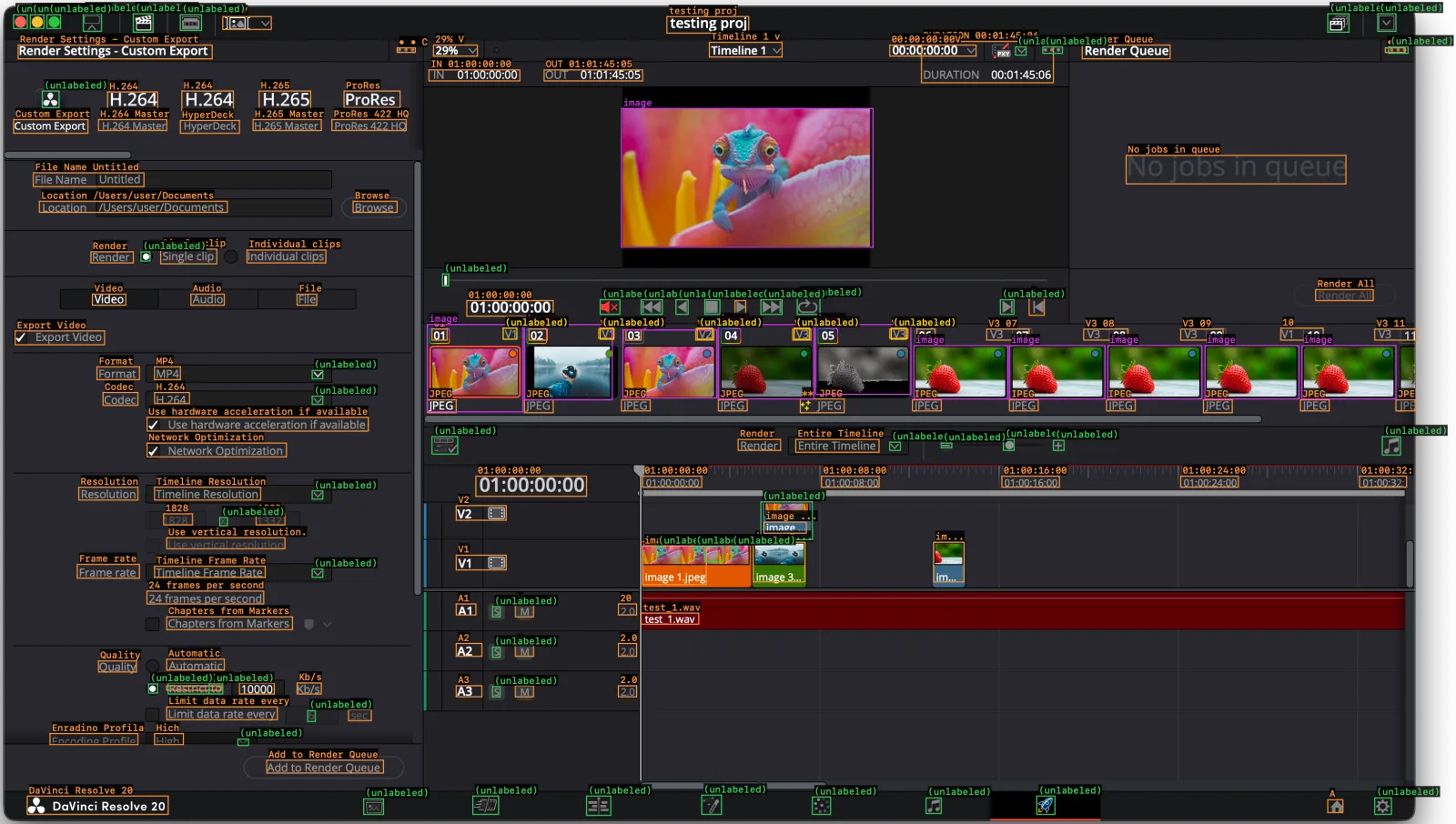
app: DaVinci Resolve
viewport_px[2]: 3248,1970
coordinates: "top-left pixels, rounded"
labeled[122]{type,label,x,y,w,h}:
  text,IR V,581,98,104,28
  text,testing proj,1533,98,175,35
  control,"DURATION 00:01:45:06",2079,152,283,89
  text,Timeline 1 v,1624,154,156,32
  text,Render Settings - Custom Export,143,160,416,30
  text,29% V,1033,160,94,24
  text,"00:00:00:00V",2011,160,185,24
  text,Render Queue,2423,160,188,30
  text,• • C,955,165,39,10
  text,• •c,3073,165,42,10
  text,"IN 01:00:00:00",1023,213,195,24
  text,"OUT 01:01:45:05",1270,213,211,24
  text,H.264,494,258,110,41
  text,H.265,659,258,110,37
  text,ProRes,841,258,120,35
  text,H.264,335,260,107,37
  image,image,1436,296,539,297
  text,Custom Export,133,319,159,30
  text,H.264 Master,315,319,146,24
  text,H.265 Master,646,319,146,24
  text,ProRes 422 HQ,815,319,159,24
  text,HyperDeck,490,321,127,28
  text,No jobs in queue,2517,396,471,61
  text,File Name Untitled,175,433,237,30
  text,Location /Users/user/Documents,188,494,403,24
  text,Browse,861,494,94,24
  text,Single clip,448,597,120,32
  text,Individual clips,633,599,169,28
  text,Render,299,603,91,24
  text,Render All,2923,684,123,24
  text,Video,302,693,71,24
  text,Audio,513,693,71,24
  text,File,741,693,42,24
  text,K,2309,701,32,37
  text,"01:00:00:00",1104,707,185,33
  text,•,1679,707,23,28
  image,image,1020,758,205,187
  image,image,1228,758,188,162
  image,image,1643,758,205,160
  image,image,1851,758,205,150
  control,"10",2848,766,91,26
  text,"01",1030,768,32,24
  text,"02",1237,768,39,24
  text,V1,1387,768,32,20
  text,"03",1445,768,32,24
  text,V2,1595,768,39,24
  text,V3,1803,768,39,24
  text,V3,2011,768,39,20
  text,"06",2069,768,39,24
  text,V3 07,2218,768,91,24
  text,V3 08,2426,768,94,24
  text,V3 09,2634,768,91,24
  text,V3 11,3050,768,91,24
  image,image,1439,770,201,146
  control,Export Video,136,772,192,30
  image,image,2062,804,201,114
  image,image,2267,804,205,114
  image,image,2478,804,201,114
  image,image,2686,804,201,114
  image,image,2894,804,201,114
  text,Format,312,849,91,28
  text,MP4,435,849,55,28
  text,Codec,325,904,75,28
  text,H.264,435,904,75,24
  text,** JPEG,1819,918,94,30
  text,JPEG,1020,920,62,28
  text,JPEG,1228,920,62,28
  text,JPEG,1436,920,62,24
  text,JPEG,1643,920,62,24
  text,IPEG,2059,920,62,24
  text,IPEG,2267,920,62,24
  text,IPEG,2475,920,62,24
  text,JPEG,2683,920,62,28
  text,JPEG,2891,920,62,24
  text,JPE,3095,920,42,24
  control,Use hardware acceleration if available,419,957,474,30
  text,Render,1686,1005,91,24
  text,Entire Timeline,1809,1005,179,28
  control,Network Optimization,419,1013,299,30
  text,"01:00:00:00",1124,1084,237,43
  text,"01:00:00:00",1481,1084,127,24
  text,"01:00:08:00",1864,1084,123,24
  text,"01:00:16:00",2251,1084,123,24
  text,"01:00:24:00",2634,1084,123,24
  text,"01:00:32:",3017,1084,101,24
  text,Resolution,273,1107,127,28
  text,Timeline Resolution,435,1107,227,28
  control,V2,1082,1147,107,32
  text,"1828",455,1164,62,24
  text,"1332",653,1164,62,24
  text,image ...,1741,1182,91,24
  text,Use vertical resolution.,461,1215,253,24
  control,image 3...,1718,1225,110,85
  control,im...,2105,1225,65,85
  control,image 1.jpeg,1481,1233,136,83
  control,V1,1082,1253,107,32
  text,Frame rate,270,1273,133,30
  text,Timeline Frame Rate,435,1277,237,24
  text,24 frames per second,419,1330,250,28
  text,A1,1082,1357,42,24
  text,M,1208,1357,39,28
  text,"20",1429,1357,39,24
  text,test_1.wav,1478,1377,123,24
  text,Chapters from Markers,461,1385,270,28
  text,A2,1082,1442,55,28
  text,"2.0",1429,1442,39,28
  text,M,1208,1446,39,24
  text,Automatic,461,1476,123,24
  text,Quality,315,1479,81,24
  text,"10000",617,1527,75,24
  text,Kb/s,741,1527,52,24
  text,bctrict to,461,1533,117,10
  text,A3,1082,1533,55,24
  text,M,1208,1533,39,24
  text,"2.0",1429,1533,39,24
  text,Limit data rate every,461,1578,237,28
  text,sec,851,1584,49,24
  text,Enradino Profila,211,1635,188,24
  text,Hich,435,1635,62,24
  text,Add to Render Queue,676,1692,250,28
  control,DaVinci Resolve 20,162,1769,302,39
  text,A,2949,1777,32,28
unlabeled[58]{type,label,x,y,w,h}:
  icon,(unlabeled),283,93,39,37
  icon,(unlabeled),390,93,42,39
  icon,(unlabeled),2949,93,45,39
  icon,(unlabeled),3056,93,39,37
  icon,(unlabeled),133,95,29,30
  icon,(unlabeled),169,95,29,30
  icon,(unlabeled),205,95,29,30
  icon,(unlabeled),490,95,45,33
  icon,(unlabeled),2280,164,23,18
  icon,(unlabeled),2339,164,42,14
  icon,(unlabeled),3079,164,42,14
  icon,(unlabeled),195,258,36,35
  icon,(unlabeled),406,603,19,20
  icon,(unlabeled),1052,650,13,26
  icon,(unlabeled),1812,701,49,35
  icon,(unlabeled),1390,705,42,32
  icon,(unlabeled),1478,705,45,32
  icon,(unlabeled),1553,705,26,32
  icon,(unlabeled),1614,705,32,32
  icon,(unlabeled),1734,705,45,32
  icon,(unlabeled),2248,705,29,32
  overlay-candidate,(unlabeled),1182,766,29,24
  overlay-candidate,(unlabeled),1390,766,29,24
  overlay-candidate,(unlabeled),1598,766,32,24
  overlay-candidate,(unlabeled),1806,766,32,24
  overlay-candidate,(unlabeled),2014,766,32,24
  icon,(unlabeled),773,857,23,18
  icon,(unlabeled),773,912,23,18
  icon,(unlabeled),1030,999,55,37
  icon,(unlabeled),3066,999,39,39
  icon,(unlabeled),2254,1005,23,24
  icon,(unlabeled),2361,1007,23,22
  icon,(unlabeled),2011,1011,23,18
  icon,(unlabeled),2121,1013,23,10
  icon,(unlabeled),773,1115,23,18
  icon,(unlabeled),1734,1139,110,81
  icon,(unlabeled),575,1172,16,18
  icon,(unlabeled),1510,1233,13,18
  icon,(unlabeled),1592,1233,13,12
  icon,(unlabeled),1614,1233,39,33
  icon,(unlabeled),1669,1233,13,18
  icon,(unlabeled),773,1282,23,18
  icon,(unlabeled),1160,1363,16,22
  icon,(unlabeled),1160,1450,16,22
  icon,(unlabeled),464,1527,88,24
  icon,(unlabeled),422,1529,19,20
  icon,(unlabeled),552,1529,29,22
  icon,(unlabeled),1160,1535,16,22
  icon,(unlabeled),763,1586,16,24
  icon,(unlabeled),614,1647,23,14
  icon,(unlabeled),1608,1767,42,41
  icon,(unlabeled),1117,1769,55,39
  icon,(unlabeled),1361,1769,52,41
  icon,(unlabeled),2326,1769,39,39
  icon,(unlabeled),1845,1771,39,37
  icon,(unlabeled),2088,1773,32,33
  icon,(unlabeled),3050,1773,36,35
icon,(unlabeled),883,1775,42,3301 / On your Mac
Each window becomes text, locally. Your model gets that text and your task, not your screen.
02 / Your data
App knowledge and conversations live in files on your Mac. Model requests go to your chosen provider.
03 / Open source
The engine that reads, acts and checks is open. Inspect it, build on it, contribute.
04 / Apache 2.0
Build on it.
Mecum is licensed under Apache 2.0. Fork it and use it in your own projects.
View on GitHub01 / Legacy software
Automate repetitive steps in the desktop software your business already relies on.
02 / Desktop workflows
Your process crosses desktop tools and internal systems. You need automation where the integrations stop.
03 / Agent builders
Connect Claude Code or Codex to desktop tools over MCP, with structured window context and clear action results.
Blog
Our eight-app comparison found 85–97% fewer estimated tokens per full read with Mecum. See the per-app results, method and tradeoffs against Cua Driver.
 Loris Comba
Automate Mac apps with scripting, Shortcuts or computer use. Choose a method for your task, run a small trial and verify the output.
 Ronaldo Zefi
Mecum lets agents work in desktop apps while you keep using your Mac. A free, open source macOS app with MCP support for Claude Code and Codex.
Loris Comba